Today we're open-sourcing Sightmap (yes, sightmap, not sitemap), a runtime map that annotates your app for the agents operating it: every view, component, and API request gets a semantic name and a memory of how it behaves.
When an agent views a page, it starts without context. It builds an understanding by inspecting the accessibility tree, reasoning about where buttons navigate, and solving UI quirks it already handled last run. Multiply that across the inner loop, like reproducing a bug or verifying a fix, and you create a lot of duplicate work.
A sightmap makes understanding an app durable and shared. Instead of re-deriving the UI every run, agents draft the map as they work, you review the diff like any other change, and the next run reads that context instead of rebuilding it. If you run agents against your app during development or testing, this makes them faster, cheaper, and more reliable.
Let's look at an example of an accessibility tree for a checkout form. Toggle the widget to with a sightmap to see an agent-facing tree appear, CheckoutForm, CardFieldset, ContinueButton, plus a memory note explaining why Continue is disabled. Every line carries a name and a memory the agent would otherwise re-derive.
The accessibility tree is a specialized representation of the app built for assistive technologies. Sightmap builds the equivalent for agents: a runtime component tree that takes the accessibility tree as one input and annotates it with the names and memory from your .sightmap/ corpus. That agent-facing tree is what's being developed at sightmap.org through the open-source sightmap project.
A sightmap is your app's agent-facing layer
Sightmaps are learned from the running app: an agent drives it, and every interactive element, error state, and API request gets a name and an optional memory field. When every interactive element is named and every true-positive error state defined, the map is complete.
The result is a directory of small YAML files, checked into your repo alongside the codebase. sitemap.xml tells a search crawler how to crawl your public pages; a .sightmap/ teaches the agents working on your app how to use it.
Views and Components
A view maps a route to the components on it, and components nest hierarchically, children under parents, to create unique locators. When a URL matches the route, that view's components, plus any globals, are what the sightmap resolves against the live DOM.
1version: 1
2views:
3  - name: Checkout
4    route: /checkout
5    components:
6      - name: CheckoutForm
7        selector: '[data-component="CheckoutForm"]'
8        source: src/components/checkout/CheckoutForm.tsx
9        memory:
10          - 'CardFieldset validates on blur. Tab or click off a field before submitting, or ContinueButton stays disabled.'
11        children:
12          - name: CardFieldset
13            selector: '.card-fieldset'
14            children:
15              - name: CardNumberInput
16                selector: 'input[name="card"]'
17              - name: ExpiryInput
18                selector: 'input[name="expiry"]'
19              - name: CvcInput
20                selector: 'input[name="cvc"]'
21          - name: ContinueButton
22            selector: 'button[type="submit"]'
A component that recurs across views, like a site header or footer, lives once at the root and each view pulls it in with $ref: SiteHeader instead of redefining it.
Request
A request names an API call the way a component names a DOM node, except it surfaces in the network trace instead of the tree. The field shapes document the payload the agent should expect.
1version: 1
2requests:
3  - name: SubmitCheckout
4    route: /api/checkout
5    method: POST
6    description: Charges the card and creates the order
7    source: src/api/checkout.ts
8    request:
9      fields:
10        - name: cardToken
11          type: string
12        - name: total
13          type: number
14    response:
15      fields:
16        - name: orderId
17          type: string
18        - name: status
19          type: string
Those two examples cover the fields you'll reach for most; the full schema, every field, type, and matching rule, lives in the spec here: https://github.com/sightmap/sightmap/blob/main/spec/v1/schema.md.
The sightmap toolkit
The open-source @sightmap/sightmap package is our reference implementation. It gives you four things:
- CLI — the
sightmapcommand: build and validate a corpus, score coverage, and drive the page by component name. - Browser — a bundled Chrome-for-Testing instance, driven over the Chrome DevTools Protocol (the same CDP as Playwright and Chrome DevTools MCP), so the tools run against a real page.
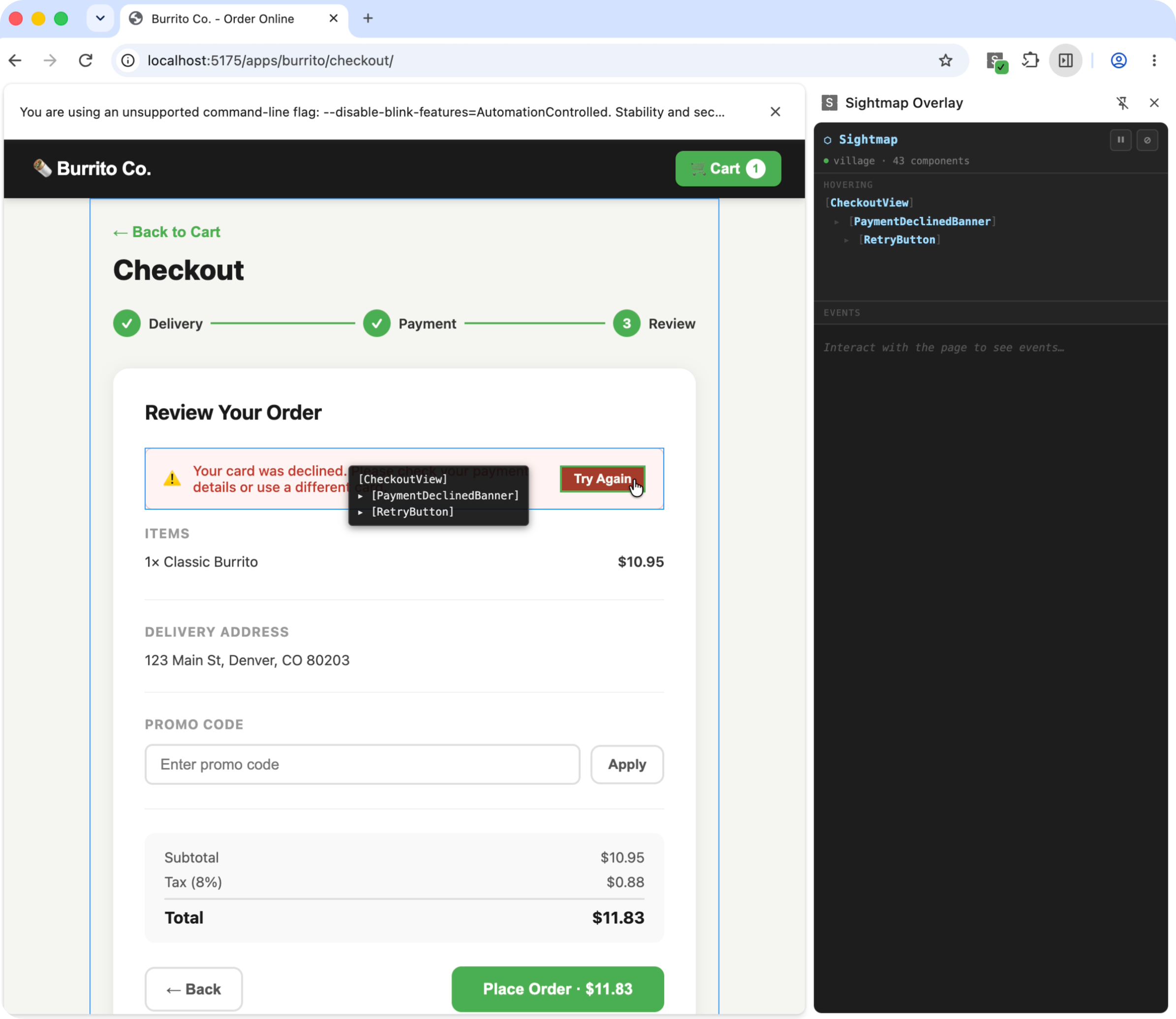
- Extension — a live overlay of coverage and the event stream, so you can watch what the tools see while you author.
- Skills — two agent playbooks,
sightmap-authoringandsightmap-browser, one for each job below.
Install
1npm install -g @sightmap/sightmapAdd both skills to your agent with sightmap skills install.
Author
The sightmap-authoring skill builds and maintains the corpus. An agent loads it and works an edit-verify loop against the running app: score the page's coverage, confirm a selector for an unnamed element, add it, validate. The CLI keeps score, flagging gaps and stale references until every interactive element is named. Under the hood, the loop runs commands like these:
1sightmap browser start --url http://localhost:5173/checkout        # once: launch Chrome + corpus server
2
3sightmap snapshot --coverage --url http://localhost:5173/checkout  # per cluster: T1 direct, T2 scoped, T3 orphaned
4sightmap sel-probe -- '[data-testid="continue-button"]'            # confirm the suggested selector
5# ...add ContinueButton to .sightmap/views/checkout.yaml...
6sightmap validate                                                   # check the whole corpus
Operate
Once the map exists, the sightmap-browser skill drives the app by name instead of selector. A route scopes the sightmap to one view, its components match against the live page, and the agent works by component name, so instead of hunting the DOM for button[data-testid="checkout-continue"]:
1sightmap browser start --url http://localhost:5173/checkout   # launch Chrome + session
2sightmap snapshot                                             # annotated, named tree + coverage
3sightmap browser fill 'CardNumberInput' '4242 4242 4242 4242' # target components by name
4sightmap browser click 'ContinueButton'                       # not a CSS selector
5sightmap browser screenshot --component CheckoutForm --out checkout.png
Each name resolves against the live component tree on the call. When markup changes, the name stays put and you fix its selector in one place, so the commands and any scripts built on them keep working, instead of chasing a stale selector across a test suite.
Skills load context up front; sightmaps disclose it in context
Skills are a simple, elegant solution for agent memory, but they dump all their context into the prompt up front, regardless of what the agent is looking at, so stale or irrelevant rules load anyway and the agent has to reason about when they apply. A sightmap turns that into progressive disclosure: the interface surfaces only the active components and their memories, scoped to what the agent is doing right now.
This is helpful for keeping an agent's attention on the view it's actually operating. Loaded as a skill, the whole corpus for our demo app is context the agent carries on every turn, whatever screen it's on, so rules for other pages compete for its focus. Progressive disclosure hands it only the active view, which keeps it coherent deeper into a session.
The whole map, loaded every turn. Grows with the app.
Only the active view. Bounded, whatever the app's size.
What the agent carries each turn, measured on our demo app: the whole rule library versus one view.
Memory records the runtime behavior
As we developed the sightmap spec, we realized semantic names didn't explain a component's runtime behavior. Agents need to know how to operate the app at the component level, and they started annotating our sightmaps with notes about it themselves. We formalized that into memory.
Take a DeliveryDatePicker on a checkout flow. It looks like a normal date-picker dialog: click the field, a calendar opens, click a day. What's not obvious is you can operate it by typing into a text field in the format MM/DD/YYYY. When an agent discovers that shortcut, memory preserves it.
The next agent to reach this screen skips the calendar entirely, because the memory on DateTrigger surfaces the moment this screen comes into view:
1sightmap browser fill 'DateTrigger' '12/28/2026'Memories attach at three levels: view, component, and request. Each entry is one plain sentence, surfaced whenever that scope is active. The spec's own date-picker example carries exactly the note our story needed:
1- name: DepartureDatePicker
2  selector: '[data-picker="departure"]'
3  memory:
4    - Accepts typed YYYY-MM-DD — skips the calendar
5    - Past dates render but are aria-disabled
A request memory reads the same way, Rate-limited to 10 requests/min per user; returns 429 beyond that, except it surfaces in the network-trace view instead of the DOM.
What's next: static analysis and pathing
The bigger bet, which we haven't built yet, is static analysis: pathing through an app without spending agent tokens on the intermediate navigation steps. If the runtime map already knows that clicking Checkout leads to /checkout, that the form has fields with prerequisites, and that clicking Continue leads to /confirmation, an agent can build a script that walks that path for free. That moves the agent to where you actually want it thinking, and spends tokens only on the pages that matter: the ones with new changes, the ones with decisions, the unmapped sections. A big part of this is low-tier models navigating complex apps with a fraction of the friction they'd otherwise hit.
The same map helps in two directions beyond navigation. On the review side, an agent's report of what it saw is only worth reading if it can separate a real failure from a cosmetic one, and that judgement is exactly what a memory entry can hold: the true positive recorded once, rather than re-derived on every run. On the find-and-fix side, a sightmap turns "jump from this live view into the code that renders it" into a lookup, and gives an agent a path from entry point to component to test when it needs to change a UI file and verify the change against the running app.
There's a standards question sitting underneath this too. A sightmap is scoped to the agents you run against your own codebase, not the agent riding along in a customer's browser tab, and browser vendors are moving to serve that other case: WebMCP, an early W3C proposal from Google and Microsoft, lets a page declare callable actions for an in-browser agent acting on the user's behalf. Different problem, same direction: less agent guesswork, more of the app just telling you what it is.
Read the source, file issues, or point an agent at your own app: github.com/sightmap/sightmap.